
How to build asset files to be used in Monogame for WinRT


Building asset files to be used in Monogame for WinRT

Let's start preparing the assets (.xnb) files for used in Monogame using XNA Game Studio 4.0. If you missed the article about installing XNA Game Studio, please have a look at @
http://gamedevresources.blogspot.sg/2012/08/installing-windows-phone-7-sdkxna-game.html

Step 01

Create a new XNA Game Project for windows as shown in the figure below.


Step 02

In the project pane, you will see that the WindowsGame1 project is referenced to the Content project where you can actually add all the contents that you required for the game.
In this example,  I added several folders where each folder contains relative assets to be built to use in Monogame WinRT.
SpriteFont are also accepted in Monogame and you can also put your spriteFont in the content folder to get built too.

Step 03

Now hit, F5 button or run the project and the blank windows will comes out as you're running the game. By the time the game is running, all the assets are compiled into .xnb file automatically from the XNA build pipeline.
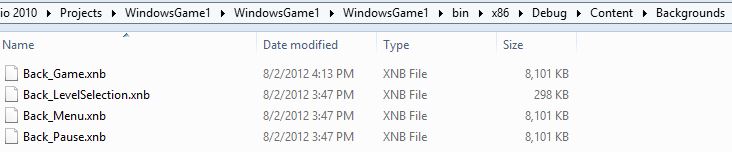
These .xnb files are the one that you can use for your Monogame WinRT Project which is located in your project bin folder as shown in the figure below.


Thanks you for your reading and I hope that you enjoyed the blog.

Please like our facebook page @https://www.facebook.com/pages/Game-Development-Sources/147251618745857

Play battle tank game online free @http://www.tankrivals.com/
Check out more organised blog posts @ http://gamesdevtutors.com/

Comments

Popular posts from this blog

Using XAML on Monogame for WinRT (Part 2)

Integrating Monogame with XAML Metro UI If you're coming from the previous section, you now have a metro UI application project with blank page and also have monogame.windows8 library reference to the project. Now Let's fix some source code for the  pages to get XAML working with monogame. Step01 ( Hacking App.xaml.cs file) App.xaml.cs delivers the most important start point while rendering a particular page in Metro UI application. I added gamePage and mainPage as  a public variables as they become accessible from other classes to for page nagivations. Here is the source code for to see what it looks like for the final App.xaml.cs file. sealed partial class App : Application     {         public ContentManager Content { get; set; }         public GameServiceContainer Services { get; set; }         public GamePage gamePage;         public MainPage mainPage;   ...

Getting Started with Monogame for WinRT

Monogame is the opensource XNA development framework where the XNA developers for XBox, Windows and WP7 can be able to port their games for iOS, Android, Mac OSX, Linux, Windows 8 Metro Style apps and PlayStation Mobiles. As XNA framework is not allowed to create Windows 8 Metro App anymore,  Monogame becomes the best framework to port the current games written in XNA. Monogame framework rewrite the XNA wrappers using SharpDX which is the current fastest Direct X Wrapper for C#. Although there are opensource game development frameworks for WinRT is available, Monogame is the one that shouldn't miss if you're a former XNA developer or C# programmer. You will need the following software and tools if you're really new to WinRT development environments. Windows 8 Release Preview   Visual Studio 2012 Release Candidate   They're currently in beta, so you can go unlimited trials for these until the final releases comes out. If you're not planning to...

Optimising Unity new UI System

UI/Sprite textures aren't packed into a texture atlas by default. A tag is needed to group them. Read the documentation / tutorial on the sprite packer. Overlapping text/graphic boundaries with another text/graphic will create additional draw calls, even if the actual visual graphics do not overlap. Grids (other layouts too I presume) need minimum 1 pixel spacing between items, else items are considered overlapping and will create additional draw calls. Images with alpha 0 are still rendered. They are rendered with alpha 0 even though they are not seen. Unity currently does not support non-rectangle shapes as Sprites, so using the TightSpitePacker policy will cause image artifacts. When UI objects are offscreen, they are still batched (rendered as well?). Possible solutions: Change parent to non-UI parent, as UI Camera will no longer detect it Change layer of panel so UI Camera will no longer detect it Disable gameobject when off-screen ScrollRect performance tuning S...